
“I have a plan. It's mostly vibes.”
For the group chat lore
Great friends.
Terrible takes.
Some messages deserve to outlive the scroll. Save the funniest things your friends say in Discord. Bring them back at exactly the right moment.
I have a plan.
It's mostly
vibes.
Inside jokes✦Questionable wisdom✦Legendary one-liners✦Community lore✦
Catch a good one
From chat to
server legend.
Save a message in Discord so you can find it again when the chat needs a reminder.
- 1
Invite your new archivist
Add Quotable to your server and give it access to the channels you want to quote.
- 2
Spot a keeper
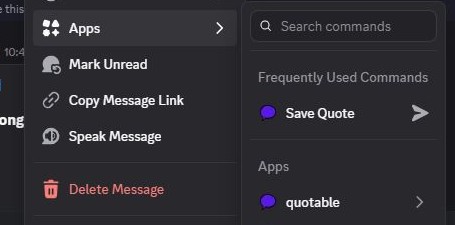
Right-click a message → Apps → Save Quote. Or reply to the memorable message with
!quote. - 3
Revive the lore
Search for that one line, star a favorite, or let
/quote randombring back a classic.
Keep the lore alive
Excellent quotes.
Dubious advice.
The questionable advice. The dramatic voice chats. The gaming moment taken out of context. Keep your server's best lines ready for their next comeback.
EXAMPLE
“My microphone is muted emotionally.”
“I can explain. I just won't.”
Less typing, more reminiscing
A good memory.
A short command.
Use these slash commands to save a message or find a quote.
Manage your server/quote save- Save a message using its link or ID.
/quote random- A surprise from your server's archive.
/quote search- Find that line by its words or author.
/quote list- Browse the archive, one page at a time.
/quote favorite- Star a keeper. Revisit with
/quote favorites. /quote show- Recall a quote by its number.
There's also /quote top and /quote help. Moderators can delete, import a channel, and export quotes. Features and limits depend on your server's tier.
Help with Quotable
Good questions.
Is it free?
Quotable has a Free tier for saving and recalling your server's quotes. Features and limits depend on your server's tier; managers can see the current policy in the dashboard.
Can everyone see private-channel quotes?
Quotable stores saved quote text and source metadata in its database, scoped to your server. Discord commands only recall quotes from source channels you can read. Slash-command recalls from another channel are shown privately to the person using the command. Authorized server managers can browse the archive in the management dashboard.
How do I set it up?
Add the bot, then give it View Channel, Read Message History, Send Messages, and Embed Links in the channels you want to use. Right-click a text message → Apps → Save Quote. Sign in to Manage bot for a channel-access check and settings.
Who can manage the server's archive?
Members with Manage Server or Administrator permission can use the website dashboard. Deleting and bulk importing or exporting quotes requires Manage Messages permission in Discord.
Does it read my DMs?
Quotable works in servers. It doesn't save or respond to direct messages.
What if a quote should be removed?
A moderator can use /quote delete with its quote ID. Server managers can also delete it from the dashboard's quote browser.
Contact & support
Need a hand?
Or a bot of your own?
Future you will thank you
Keep the good ones.
Keep the lore alive as long as your server exists.
Add to Discord